
Rugby Subs Fees Tracker Excel – Free Template (2026)
Accounting & GST
ACC Levy Excel - Free Template
Track ACC classification units, levy amounts, GST and payment status in one register for New Zealand businesses.
2026-06-26
171 downloads
4.8/5 average rating
Download template
This ACC levy Excel template is a register for tracking classification units, levy codes, unit counts, levy amounts, GST and payment status in one place. It gives you a working levy table, a summary dashboard and simple instructions sheet.
Use it if you are reconciling ACC charges for a small business, a trades firm or a sole trader with more than one activity code. The workbook is set up to help you record each levy line, check totals and see what is still unpaid at a glance.
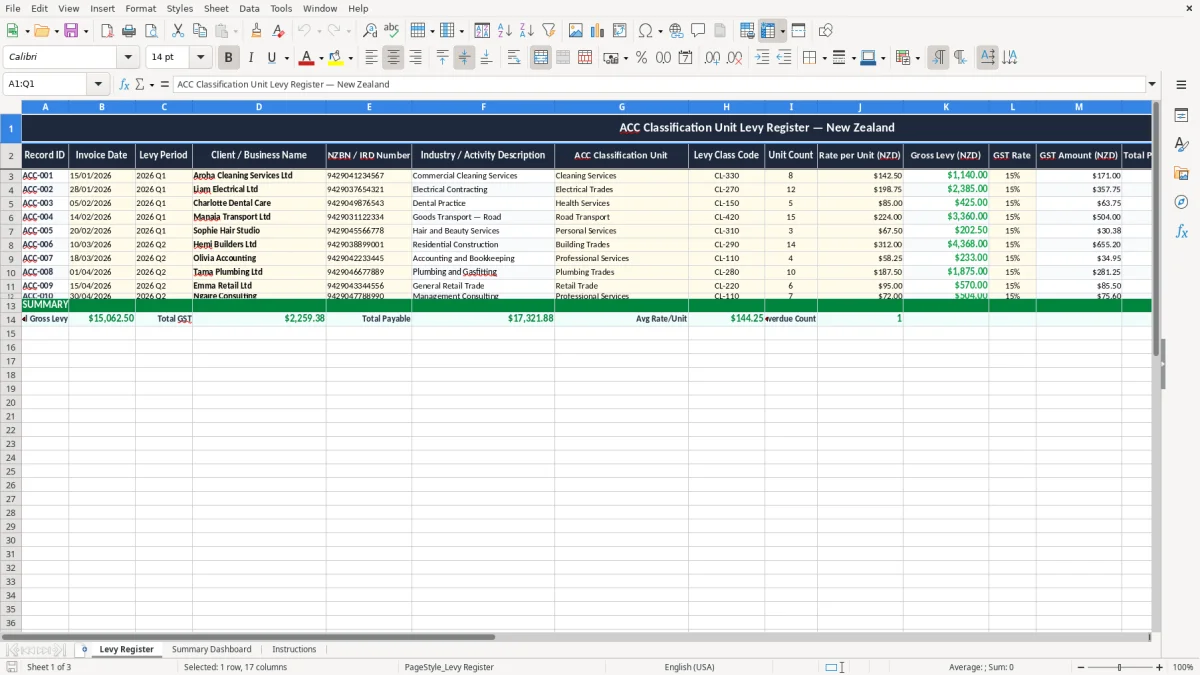
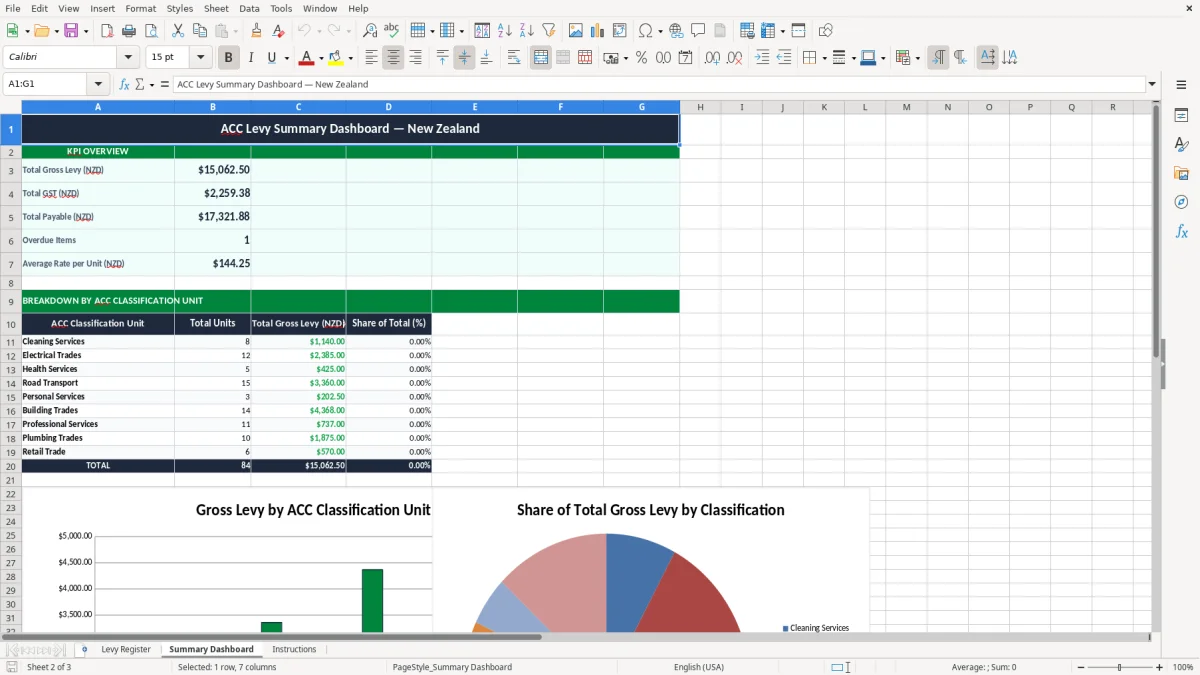
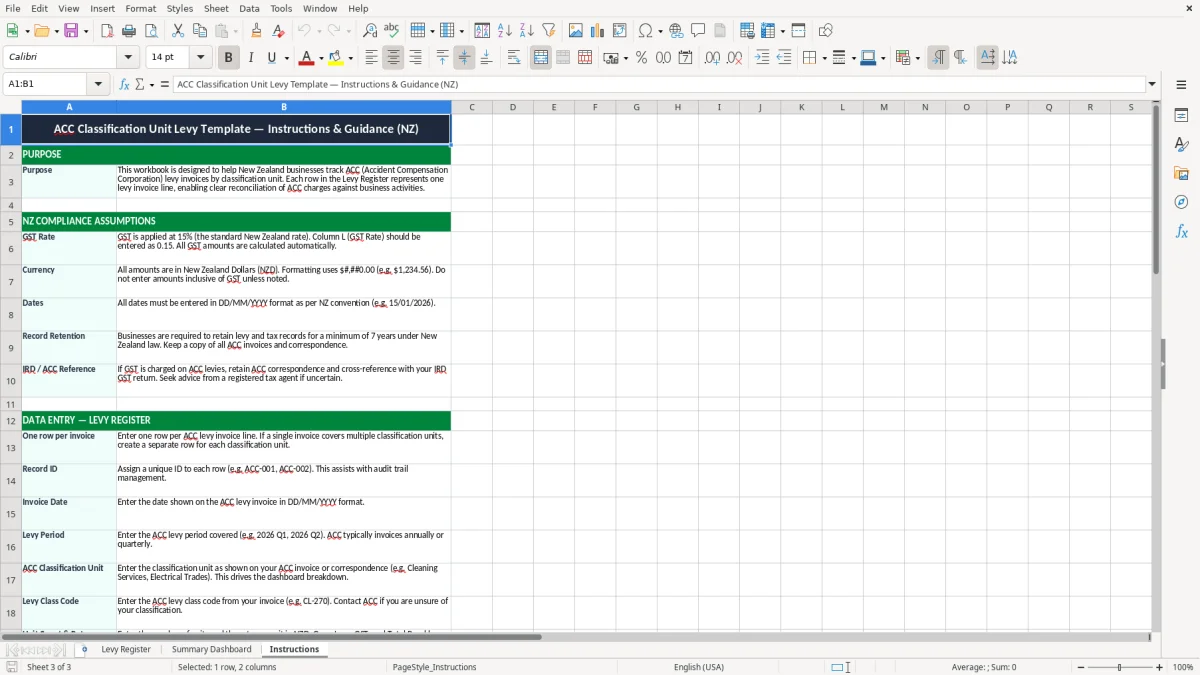
Image 1 shows the Levy Register sheet with the main entry table. Image 2 shows the Summary Dashboard, and image 3 shows the Instructions sheet for setup and use.
The key benefits of this Excel template
- Keeps every levy line in one register, so you can match invoices to the right ACC classification unit without hunting through emails.
- Shows gross levy, GST amount and total payable separately, so you can check a $1,000 levy before you pay it.
- Helps you spot unpaid items early with a clear payment status column and due date field.
- Works well for a small firm with 8 or 12 levy lines a year, where a simple spreadsheet is faster than a full system.
- Supports cleaner record-keeping for Inland Revenue and your own files by keeping business name, NZBN / IRD number and activity description together.
- Makes month-end or year-end checks quicker because the summary dashboard pulls totals from the register automatically.
- Gives you a practical way to track what each business unit is costing, which helps with pricing and cash flow decisions.
Step-by-step guide
- Open the Levy Register sheet and start with the first empty row under the headers. Enter the invoice date, levy period, client or business name and the relevant ACC classification unit.
- Add the levy class code, unit count and rate per unit. For example, 3 units at $420.00 each gives a gross levy of $1,260.00 before GST.
- Check the formula columns for gross levy, GST amount and total payable. If your levy is $1,260.00, GST at 15% is $189.00 and the total payable is $1,449.00.
- Update payment status and due date as invoices are paid. Use notes for anything unusual, such as a change in classification or a disputed charge.
- Review the Summary Dashboard after entry or at month end. It gives you a quick view of total levy amounts, outstanding items and the split between paid and unpaid records.
- Use the Instructions sheet if you want a refresher on the columns and the order to fill them in. Keep the file open during your levy run so the process stays consistent.
Included features
Levy Register sheet with 17 columns for record ID, dates, client details, classification unit, code, units, rates and totals.
Dedicated fields for ACC classification unit, levy class code and unit count, which suit multi-activity New Zealand businesses.
Automatic calculation fields for gross levy, GST amount and total payable.
Payment status and due date tracking so you can see overdue levy items quickly.
Summary Dashboard sheet to pull the main totals into a simple visual view.
Instructions sheet that explains the workflow without cluttering the register.
Printable layout with frozen headers, clear column widths and easy-to-read formatting.
Who uses an acc levy register in New Zealand
A register like this is for the person who has to keep levy charges straight when the paperwork lands. That might be a sole trader with one staff member, a Hamilton trades business with separate activity codes, or a bookkeeper handling monthly admin for a small Ltd company.
The pressure usually shows up when the levy invoice arrives and you need to split it by business unit or activity. If one branch has 4 units at $380.00 and another has 2 units at $510.00, the totals are different enough that a quick spreadsheet saves arguments and guesswork.
Where the register fits in the month
This is useful at invoice entry, at month end and again when you review year-end costs around 31/03/2026. It also helps if you are checking whether the charge belongs to the current profit and loss or should sit in accrued expenses for a later period.
Why the dashboard matters
Image 2 gives you a quick summary view so you can see the size of the levy bill without scrolling through every line. For a small business paying 10 levy lines at an average of $245.00, you are looking at $2,450.00 before tax, which is much easier to manage when the totals are visible.
What Inland Revenue and ACC expect you to keep
Inland Revenue expects good records to be kept for 7 years, so a levy register that stores invoice date, client name, levy period and notes is a practical fit. If you later need to explain why a charge was coded to one activity rather than another, the history is already there.
For any business registered for GST, the levy register should also make the 15% tax visible. A gross levy of $2,000.00 has $300.00 GST on top, so the total payable becomes $2,300.00 and you can see the split instantly.
Keep the fields that matter
The template includes NZBN / IRD number, levy class code and industry description because those are the identifiers that stop one charge being mixed up with another. That matters more once you have two or three locations, or you are comparing charges across different jobs in the same company.
Use it alongside your financial year end
If your balance date is 31 March, the register gives you a cleaner start for your year-end review. You can check which levy items were paid, which were still open, and whether any amounts need to be carried into the next period before you finalise the profit and loss.
That year-end review naturally leads into the IR3 income tax return, where the same paid-and-open checks feed directly into the figures you need to finalise.
Where levy spreadsheets usually go wrong
The most common mess is mixing up the unit count and the rate per unit. If 5 units at $275.00 are entered as 5 x $25.00, you are short by $1,250.00 and the error can sit there until the payment reminder arrives.
Another problem is leaving GST out of the total payable. On a $1,600.00 levy, the missing $240.00 GST is not small change for a tight cash flow month, especially if you have wages, rent and fuel going out at the same time.
Bad references cost time
If the record only says “levy” with no client or activity detail, you waste time matching it back to the invoice later. A bookkeeper can burn 20 minutes on one line, and on a 15-line run that is 5 hours gone before you have even started chasing unpaid items.
Payment status stops double handling
Without a clear paid/unpaid flag, levy charges get paid twice or forgotten altogether. I have seen small firms send the same $980.00 payment twice because the original invoice was printed, filed and never marked off; that ties up cash and creates a tidy mess to unwind.
That same kind of double handling shows up in provisional tax records, where every instalment needs a clear paid status and due date to avoid repeat payments or missed amounts.
How to make the register part of your routine
Put the levy update into a fixed job, not an optional one. The easiest spot is right after bank reconciling or on the same day you do the GST return, because you are already looking at business spend and cash.
Small habits that stick
- Enter each invoice the same day it arrives, so the due date and payment status stay current.
- Keep the unit count, rate and notes in the same order every time so the sheet stays easy to scan.
- Use the dashboard once a week to check what is unpaid and what totals are building up.
When a spreadsheet is no longer enough
If you are dealing with dozens of levy lines, multiple branches or approval steps, move the workflow into accounting software like Xero or MYOB. A spreadsheet is ideal for a small, controlled register; once the process needs audit trails, document links and multi-user access, software wins.
Until then, this workbook is a tidy middle ground. It gives you structure without forcing you into a bigger system before you need one.
Common questions about this template
It is a spreadsheet for recording levy invoices by classification unit, code, unit count, rate, GST and payment status. You use it when you want one clear place to track what was charged, what is due and what has been paid.
Yes. The register has separate fields for business name, industry description, classification unit and levy code, so you can record different units side by side and compare totals easily.
Yes. The register includes a GST rate column and formula fields for GST amount and total payable. At 15% GST, a $1,200.00 levy has $180.00 GST and a $1,380.00 total.
Keep them for 7 years to line up with Inland Revenue record-keeping expectations. That gives you a solid audit trail if a levy charge is queried later.
Yes. A sole trader can use it to track personal business levy charges, and a company can use it to keep invoices tied to its NZBN, IRD number and activity descriptions.
Move on when the register starts needing multi-user access, approval steps or lots of linked documents. If you are only tracking a manageable number of levy lines, the spreadsheet stays quicker and easier than software.
Download
File format
Excel (.xlsx)
Compatible software
Excel, Google Sheets, LibreOffice
Price
Free